Security Cameras for Restaurants: 2026 Installed Cost, Placement by Zone and How to Compare Installers
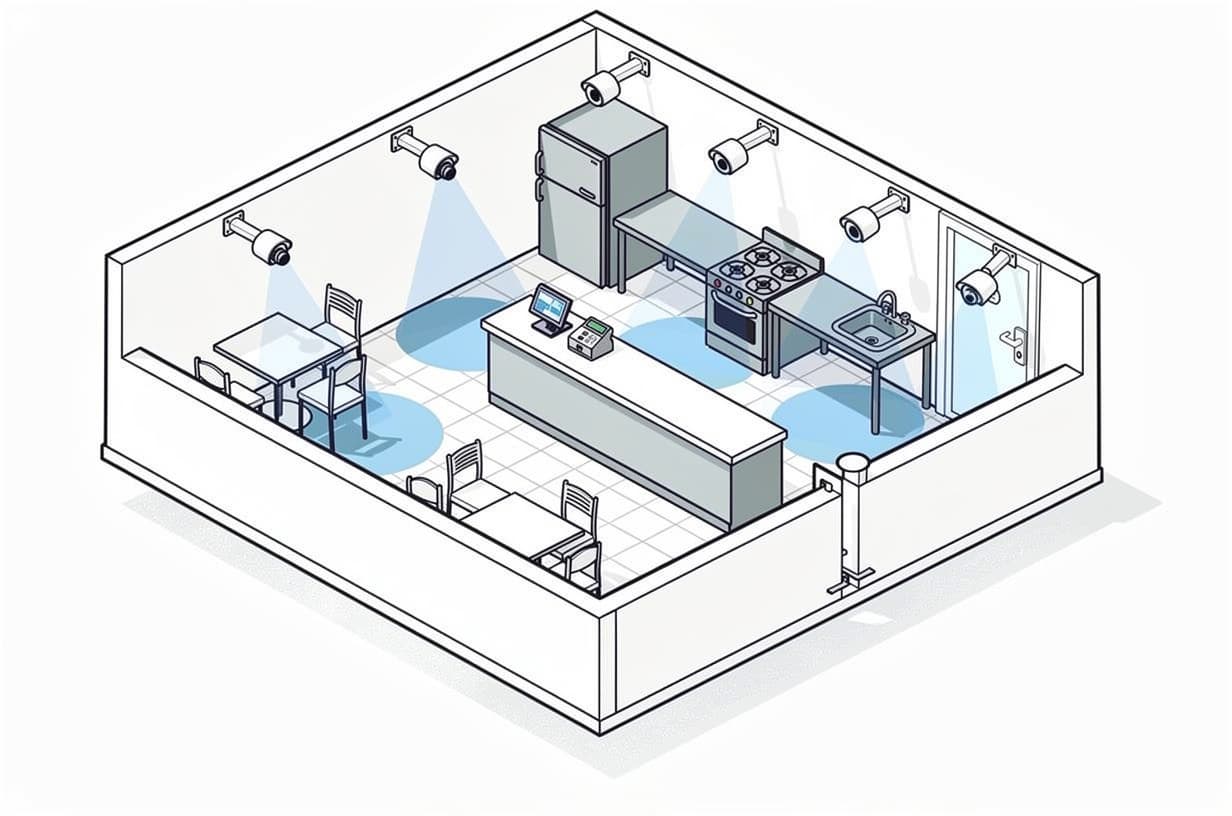
Table of contents
- What a restaurant security camera system costs in 2026
- Where cameras go in a restaurant
- Where cameras never go, and the audio rule
- How many cameras does a restaurant need?
- Four decisions a restaurant owner has to make
- Retention: how long restaurant video surveillance should be kept
- How to compare restaurant security camera quotes
- Frequently asked questions
As of October 2026, a professionally installed system of security cameras for restaurants costs $3,000 to $9,000 for a 4 to 8 camera cafe or counter-service build and $9,000 to $35,000 for an 8 to 24 camera full-service restaurant with a bar, based on the $300 to $1,500 per camera installed range in our security camera installation cost guide. Recurring cost is $0 to $40 a month with an on-site recorder, $10 to $30 per camera per month for cloud storage, and $50 to $150 per camera per month if you add live video monitoring.
The fact that sets the spec: a restaurant loses money at the register, the bar and the back door, not in the middle of the dining room. Voids, comps and refunds happen at the POS; over-pours and bottle walk-outs happen at the bar; cases of product leave through the receiving door. So the first cameras in any restaurant surveillance design go to those three places, and dining-room overviews come after, never before.
What a restaurant security camera system costs in 2026
The figures below are worked from our published ranges ($300 to $1,500 per camera installed, most at $500 to $900; $3,000 to $9,000 for 4 to 8 cameras; $9,000 to $35,000 for 8 to 24) applied to typical restaurant layouts. Installed price covers cameras, a network video recorder (NVR) or cloud gateway, PoE switch, cabling, mounts, labor, configuration and a documented camera schedule. Position inside a range depends mostly on cabling difficulty and on how many cameras need kitchen-rated or outdoor housings.
| Restaurant type | Typical camera count | Installed (Oct 2026) | Recurring per month | What that buys |
|---|---|---|---|---|
| Counter-service or cafe, 1,200 to 2,000 sq ft | 5 to 8 | $3,000 to $9,000 | $0 to $40 (NVR) or $50 to $240 (cloud) | Front door, 1 to 2 register angles, kitchen line, back door, walk-in, small overview |
| Full-service with bar, 3,000 to 5,000 sq ft | 10 to 16 | $9,000 to $20,000 | $0 to $40 (NVR) or $100 to $480 (cloud) | Everything above plus bar POS, service well, liquor storage, office/safe, 2 dining overviews, patio or lot |
| Multi-unit or franchise, per location | 12 to 24 | $12,000 to $35,000 | $120 to $720 (cloud) | Standardized camera list, drive-thru lanes, POS integration, central cloud management across sites |
Two recurring lines belong on their own row in every bid, because they are where a cheap install becomes an expensive five-year contract:
- Cloud storage: $10 to $30 per camera per month for 30 days of 1080p to 2K retention, and $30 to $60 if you want 4K or 60 to 90 days, per our cloud video surveillance guide. Multi-year licence bundles run $199 to $1,799 per camera; ask whether licence fees are sitting inside the "equipment" line.
- Live or event-based video monitoring: $30 to $75 per camera per month for alarm-triggered clip verification and $50 to $150 for scheduled live watching, per our video surveillance monitoring cost guide. For a single restaurant we recommend monitoring the intrusion alarm instead (more on that below).
Five-year example: our cloud video guide's five-year model puts an 8-camera system (a cafe) at $4,300 to $7,900 with an on-site NVR versus $13,600 to $16,800 on a $20 per camera per month cloud plan, and a 16-camera system (a full-service restaurant with bar and lot) at $8,300 to $15,100 versus $27,200 to $33,600. Cloud earns its keep for multi-site operators and for footage that must survive a stolen recorder, but a bid that only shows the monthly figure is hiding half the cost.
Where cameras go in a restaurant
As of 2026, the priority camera locations in a restaurant, in order, are: the register and PIN pad, the bar POS and liquor storage, the back door and receiving area, the kitchen line and pass, the walk-in door, the office and safe, the front door, and finally dining room, patio and parking lot overviews. Below is each zone with what the camera is for, the mounting angle, and the housing that survives there; the numbers in brackets are the positions on the plan.

Front door and host stand (position 1)
Purpose: a clear face shot of everyone who enters, which is the clip you will be asked for after a dine-and-dash, a lobby assault or a slip on a wet entry mat. Mount a turret or dome inside at 8 to 10 feet, facing the door, with a wide-dynamic-range (WDR) sensor so faces are not silhouetted by daylight. A second, wider angle over the host stand covers walk-out disputes and the waiting area.
Registers and POS terminals (positions 2 and 3)
Purpose: tie a face and a drawer to every void, comp, refund, no-sale and manual discount. Mount one camera above and slightly behind the cashier's shoulder, angled down at the drawer and screen, and a second across the counter catching the customer's face and hands. Ask the installer for a stated pixels-per-foot figure at the till; that is a spec you can hold a bid to, "HD" is not. This is where POS-linked video pays for itself: the transaction log is overlaid on the clip, so a manager can filter every refund on one server's login and jump to the footage. Our retail loss prevention guide explains exception reporting in detail; in a restaurant the exceptions worth filtering are voids after the ticket closes, comps over a set dollar amount, cash refunds, and repeated discounts on one login (the classic sweethearting pattern, where a server rings low for friends).
The PIN pad rule: as of 2026, no restaurant camera should be positioned so that it can record a customer entering a PIN. The PCI Security Standards Council's Skimming Prevention: Best Practices for Merchants (September 2014) says cameras "should be sited such that they record the area around the PIN entry device but allow no method of actually recording or viewing any PINs entered." Angle the register camera at the drawer and the cashier's hands, not the customer-facing keypad, and have your card processor confirm the placement before the installer closes out.
Bar, service well and liquor storage (positions 4, 5 and 6)
Purpose: pour control, bar-top cash handling and bottle inventory. Three angles do the job: one over the bar POS and drawer (same rules as the front register), one along the bar top catching pours and open tabs, and one on the liquor storage door or cage. Standard indoor turrets or domes are fine; low-light performance matters more than resolution because bars run dim.
Kitchen line and pass (position 9)
Purpose: food-safety documentation, workers' compensation claims (burns, cuts, falls) and plated food leaving without a ticket. Mount high at the end of the line looking down its length so the stations and the pass are both in frame. This is the one place a standard indoor camera dies: grease film builds on the lens, steam condenses inside the housing, and the nightly washdown reaches anything within range of a hose. Specify a sealed vandal-resistant dome with an IP66 or higher ingress rating (under the IEC's IP rating system, the first digit grades protection against solids from 0 to 6 and the second against liquids from 0 to 9), with a wipeable glass window rather than a plastic bubble, and get the installer to put "monthly lens clean" into the maintenance schedule.
Walk-in cooler and dry storage (position 10)
Purpose: a log of who went in and out, and when, for inventory shrink. The camera that matters is on the walk-in door from outside; a camera inside the box is rarely worth the condensation problems. If one must go inside, it needs a datasheet operating-temperature rating that covers your box temperature, a heated housing, and a sealed cable gland so moisture does not wick down the Ethernet run.
Office and safe (position 11)
Purpose: cash counting, deposit prep and safe access. One camera angled at the safe door and the counting desk, with retention long enough to cover a deposit discrepancy that surfaces at month-end. This is the feed you least want sitting on a recorder a burglar can carry out, which is the strongest argument for off-site backup of at least this one camera.
Back door, receiving and delivery pickup (position 12)
Purpose: the back door is where product leaves in a bag and where a propped door invites a walk-in theft. Mount one camera inside facing the door so every opening is logged, and one outside under the eave covering the receiving pad, dumpster and the path to a vendor's truck. Where third-party delivery drivers pick up at this door, a camera here settles "the order was never picked up" disputes with the platform. Pair the inside camera with a door contact on the intrusion panel so a door held open past a set time generates a searchable event. Outdoor units need IP66 or better, plus an impact-rated (IK-rated) housing if within reach.
Dining room (positions 7 and 8)
Purpose: slip-and-fall and liability footage, server-guest disputes and walk-outs. Two wide overviews from opposite corners cover most dining rooms; a 360-degree fisheye in the ceiling center can replace both in a square room. You are documenting incidents, not identifying faces, so a wide-lens overview camera is the right spend. Wall-to-wall dining coverage adds cameras and cloud licences without adding evidence you will ever use.
Patio, parking lot and drive-thru
Outdoor cameras cover the patio (furniture and heater theft, after-hours trespass), the parking lot (vehicle break-ins, assaults, closing staff walking to their cars) and the drive-thru lane where there is one. For the lot, a corner-mounted varifocal camera reaches further than a wide fixed lens; a plate-reading camera at the entrance is a separate line item. Drive-thru lanes get one camera at the order point and one at the pickup window, both subject to the same PIN pad rule as the inside register.
Where cameras never go, and the audio rule
Cameras never go in restrooms, employee changing areas, or anywhere a person is reasonably entitled to undress. The federal Video Voyeurism Prevention Act of 2004 (18 U.S.C. § 1801) criminalizes capturing images of a private area of a person without consent where they have a reasonable expectation of privacy, and the Reporters Committee for Freedom of the Press (RCFP) notes that every state and the District of Columbia has laws against certain uses of hidden cameras in private places. Break rooms carry privacy risk of their own: check your state's rules before placing a camera there, post a notice if you do, and keep audio off.
The audio rule: as of 2026, order restaurant cameras with audio recording disabled by default, because the RCFP's Reporter's Recording Guide lists about 11 states (California, Delaware, Florida, Illinois, Maryland, Massachusetts, Michigan for third-party recordings, Montana, New Hampshire, Pennsylvania and Washington) that require the consent of every party before a conversation is recorded, plus Missouri and Oregon for in-person conversations and Connecticut and Nevada for phone calls. Video of a dining room is one legal question; a microphone over table 12 is a different and worse one.
How many cameras does a restaurant need?
As of 2026, most independent restaurants need 6 to 16 cameras, counted by placement rather than square footage: one per register angle (usually two per register), one per bar POS, one each on the back door, walk-in door, office/safe and kitchen line, one at the front door, and one or two dining overviews. A 1,500 sq ft cafe lands at 6 to 8; a 4,000 sq ft full-service restaurant with a bar lands at 12 to 14. Vendors who sell per-camera software licences sometimes quote a cameras-per-square-foot rule that produces 20 or more cameras for a modest full-service room; a vendor paid per licence has a reason to count high.
Worked example: 1,500 sq ft cafe with one register
Front door (1), register over-shoulder and customer-facing (2), kitchen line (1), back door inside (1), walk-in door (1), dining overview (1) = 7 cameras. At $500 to $900 per camera installed, that is roughly $3,500 to $6,300 installed, plus an NVR, which sits comfortably inside the $3,000 to $9,000 tier.
Worked example: 4,000 sq ft full-service with bar
Front door (1), register (2), bar POS, bar top and liquor storage (3), kitchen line (1), walk-in door (1), office and safe (1), back door inside and out (2), dining overviews (2), parking lot (1) = 14 cameras, or 12 if the lot and outside back door are deferred. At $500 to $900 per camera plus outdoor and kitchen-rated upgrades, expect $9,000 to $16,000 installed, inside the 8 to 24 camera tier. The diagram above shows the 12-camera version.
Four decisions a restaurant owner has to make
1. Cloud storage or an on-site recorder?
Recommendation: an on-site NVR for a single location, with the office/safe feed backed up off-site; cloud for three or more locations, or when a franchisor requires central review. The recorder goes in the office or a locked closet on a small UPS, not on a kitchen shelf. If you pick cloud, ask what happens to footage if a licence lapses and whether the cameras can move to another platform later (standard ONVIF/RTSP cameras can; some cloud-native cameras cannot).
2. POS integration or not?
Recommendation: yes if you run a bar, more than one register, or any location you do not personally close. The integration is a software line item that depends on which POS you run and which platforms the bidder has actually connected to it, and it may carry a recurring fee, so get it quoted as its own row.
3. Consumer Wi-Fi cameras or a commercial PoE system?
Recommendation: commercial PoE (power over Ethernet) CCTV for restaurants of any size beyond a two-camera food truck. Consumer Wi-Fi cameras share the guest network, drop frames when the dining room fills with phones, run on plug-in power a cook can unplug, and store clips on a subscription priced for a front porch. A PoE camera gets power and data over one cable to a switch in the office, records continuously, and is what a commercial installer will warrant. Labor and cabling are a large and variable share of the installed price in a finished restaurant, which is why the same camera count varies by thousands of dollars between buildings; ask each bidder to break that share out.
4. Self-monitored or professionally monitored?
Recommendation: self-monitor the cameras and professionally monitor the intrusion alarm. Live video monitoring at $50 to $150 per camera per month is hard to justify for a 12-camera restaurant where nothing should move after close. A monitored commercial intrusion alarm with contacts on the front, back and office doors and a motion sensor in the office runs $40 to $90 a month for a storefront-sized location, and the cameras give the monitoring center a clip to verify an alarm before dispatch.
Retention: how long restaurant video surveillance should be kept
As of 2026, we recommend 30 days of continuous footage as the baseline for a restaurant, 120 days on the register, bar POS and office cameras so the clip still exists when a card dispute arrives, and an immediate export of anything tied to an incident. The timelines behind each number:
- Card chargebacks: under the Visa Core Rules (18 April 2026 edition), an issuer may raise a card-present fraud dispute (Dispute Condition 10.3) up to 120 calendar days from the transaction processing date, and Mastercard's Chargeback Guide, Merchant Edition (13 May 2025) sets 120 calendar days for most cardholder disputes. Footage of the guest at the register or table answers an "I was never there" claim, but only if it still exists at day 110, which is why the POS cameras get the longer retention.
- PCI DSS: Requirement 9.2.1.1 of PCI DSS v4.0.1 requires that where video cameras monitor sensitive areas of the cardholder data environment, "collected data is stored for at least three months, unless otherwise restricted by law." Ask your processor or assessor whether your camera coverage falls within PCI scope; if it does, 90 days is the floor.
- Slip-and-fall and other injury claims: personal injury limitation periods are set by state and are commonly two to three years, for example two years under California Code of Civil Procedure § 335.1 and three years under New York CPLR § 214. No restaurant keeps rolling footage that long, so export the clip the day of the incident, with the lead-up and aftermath, and keep it with the incident report; your liability carrier will ask for it.
Exporting a clip should be a documented routine: pick the camera and time range, export as MP4 with the system's watermark, save to two places, log who exported it, and make the installer demonstrate the steps at handover.
How to compare restaurant security camera quotes
Three bids on three different scopes cannot be compared; three bids on one scope can. We standardize the scope when we match a restaurant with contractors, and you can do it yourself with the same list:
- Same camera list and placements. Give every bidder the same numbered floor plan.
- Pixel density at the register. Ask each bid to state the resolution and lens at the till and the resulting pixels per foot.
- Kitchen and outdoor housings called out by zone. IP rating and housing type for the kitchen line, walk-in and back door should be in writing, with the lens-cleaning interval.
- Equipment ownership. Who owns the cameras and recorder at the end of the term? National providers often attach subsidized hardware to a 36 to 60 month agreement that they continue to own (our alarm monitoring page explains how a low monthly rate can signal provider-owned equipment); our commercial security system cost guide walks through how that changes the five-year total.
- Contract length, auto-renewal and escalators. Monitoring and cloud agreements commonly auto-renew with narrow cancellation windows. Get the renewal clause and any annual price escalator quoted, not just the first-year monthly.
- Cloud and POS fees per camera and per location, as separate rows. A flat monthly figure without the per-camera licence count behind it cannot be compared with an NVR bid.
- Food-service references. Two recent restaurant installs you can call. Installers who have never run cable above a hood learn on your job.
- Licence, insurance and who services it. State low-voltage or alarm contractor licence number (verify it with the issuing board), a certificate of general liability insurance naming you as certificate holder, workers' compensation, and a named service contact with a response time. Our business security camera installation guide has the full document checklist and ten bidder questions.
When you submit a restaurant profile to us, we route it to up to three contractors licensed in your state, insured by certificate, and with food-service experience, and the quote request they answer already carries the camera count, placements, retention days, term length and equipment ownership so the bids come back comparable. We do not install, monitor or mark up equipment; contractors pay for the introduction, so the service is free to you. The commercial video surveillance and CCTV page explains what a complete camera quote should contain, and our industry guides cover neighboring building types if you operate more than one.
Frequently asked questions
How much does a security camera system for a restaurant cost installed in 2026?
As of October 2026, a professionally installed restaurant security camera system costs $3,000 to $9,000 for 4 to 8 cameras (a cafe or counter-service location) and $9,000 to $35,000 for 8 to 24 cameras (a full-service restaurant with a bar, office and lot). Individual cameras run $300 to $1,500 installed, with most standard commercial IP cameras at $500 to $900 including cabling and labor.
What is the monthly cost of restaurant security cameras after installation?
As of 2026, recurring cost with an on-site recorder is $0 to $40 a month for remote-viewing software and occasional service. Cloud storage adds $10 to $30 per camera per month for 30 days of retention ($30 to $60 for 4K or 60 to 90 days). Live or event-based video monitoring adds $30 to $150 per camera per month; for a single restaurant we recommend monitoring the intrusion alarm at $40 to $90 a month instead.
How many security cameras does a restaurant need?
Most independent restaurants need 6 to 16 cameras, counted by placement: two per register, one per bar POS, and one each on the back door, walk-in door, office/safe, kitchen line and front door, plus one or two dining overviews. A 1,500 sq ft cafe typically needs 6 to 8; a 4,000 sq ft full-service restaurant with a bar needs 12 to 14.
Where should cameras never go in a restaurant?
Never in restrooms, changing areas or anywhere a person may undress. The federal Video Voyeurism Prevention Act (18 U.S.C. § 1801) and state hidden-camera laws make recording in those places a crime. Break rooms carry privacy risk, so check state rules and keep audio off. Cameras also must not be positioned to capture a customer's PIN entry on a card terminal.
Can a camera be pointed at the POS terminal without recording customers' PINs?
Yes. Mount the camera above and behind the cashier, angled at the drawer, screen and cashier's hands, and keep the customer-facing keypad out of the frame. PCI Security Standards Council guidance (Skimming Prevention: Best Practices for Merchants, 2014) says cameras should record the area around the PIN entry device without any way to view PINs entered. Have your card processor confirm the final placement.
Is it legal to record audio on restaurant cameras?
Not safely. As of 2026, about 11 states, including California, Florida, Illinois, Pennsylvania and Washington, require every party's consent before a conversation is recorded, according to the Reporters Committee for Freedom of the Press recording guide, and Missouri and Oregon require it for in-person conversations. Order restaurant cameras with audio disabled and leave it off unless a lawyer in your state signs off on a specific use.
Which cameras survive a commercial kitchen and a walk-in cooler?
For the kitchen line, a sealed vandal-resistant dome rated IP66 or higher with a glass (not plastic) window, mounted out of the washdown zone and cleaned monthly. For the walk-in, put the camera on the door from outside; if one must go inside, it needs an operating-temperature rating below your box temperature, a heated housing and a sealed cable entry so condensation does not reach the connector.
How long should a restaurant keep camera footage?
As of 2026, keep 30 days as the baseline and 120 days on register, bar POS and office cameras, because Visa and Mastercard both allow cardholder fraud disputes up to 120 calendar days after the transaction. If your processor says the cameras are within PCI DSS scope, Requirement 9.2.1.1 sets a 90-day floor. Export incident clips the same day, since injury claims can be filed two to three years later in most states.
Can restaurant cameras link to the POS to catch voids, comps and sweethearting?
Yes. POS-integrated video overlays each transaction on the register clip and lets a manager filter for voids after close, comps over a set amount, cash refunds and repeated discounts on one login, then jump to the footage. It is a software line item that depends on your POS platform, and it may carry a recurring fee, so have it quoted separately.
Do restaurants have to have security cameras?
We are not aware of a general legal requirement to install cameras in a restaurant. Camera and retention requirements, where they apply, typically come from a liquor licence condition set by a local licensing authority, a franchise agreement that specifies camera standards, or an insurer that asks for footage after a claim. Check your licence conditions and franchise manual before you set the camera count.
A restaurant does not need the most cameras; it needs the right dozen in the right places, on a recorder it owns, with a retention policy it can explain to an insurer. If you want three comparable bids on security cameras for restaurants without working the phones yourself, request your free quotes and we will match your floor plan with licensed installers who have done this in a kitchen before.
Ready to get started?
Talk to our team and see how we can help.